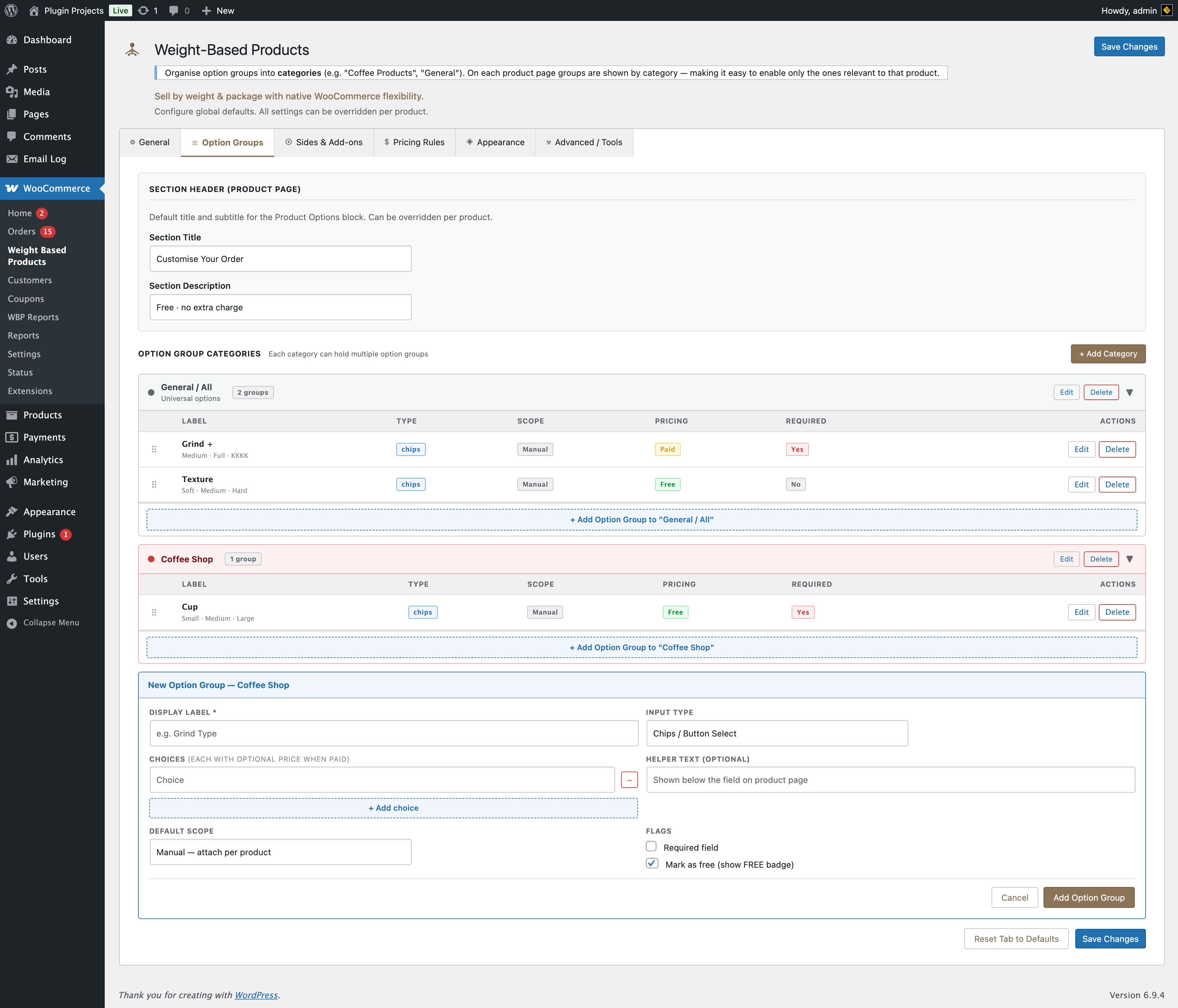
Option groups are defined globally here. On each product (Product data → Product Options) you choose which groups apply and can override labels or choices per product.
Section header (product page)
Default title and description for the “Product options” block on the frontend. Can be overridden per product.
- Section title — e.g. “Customise Your Order”.
- Section description — e.g. “Free · no extra charge”.
Option group categories
Create categories (e.g. “Coffee Products”, “General”). Each category can hold multiple option groups. On the product page, groups are shown by category so you can enable only the ones relevant to that product.
- + Add Category — Name, optional description, colour label (blue, green, orange, purple, red, gray).
Option groups (per category)
Under each category you add option groups. Each group has:
- Display label * — e.g. “Grind Type”, “Texture”.
- Input type — Chips / button select, Dropdown, Text area (free text), Single checkbox, Radio buttons.
- Choices — Each choice can have an optional price when the group is “Paid” (e.g. “Medium – $0”, “Full – $2”).
- Helper text (optional) — Shown below the field on the product page.
- Default scope — Manual — Attach per product in the product editor. Auto-attach to all products — Shown on every weight-based product.
- Flags — Required field; Mark as free (show FREE badge).
Scope “Manual” means you enable/disable and optionally override each group per product in Product data → Product Options.