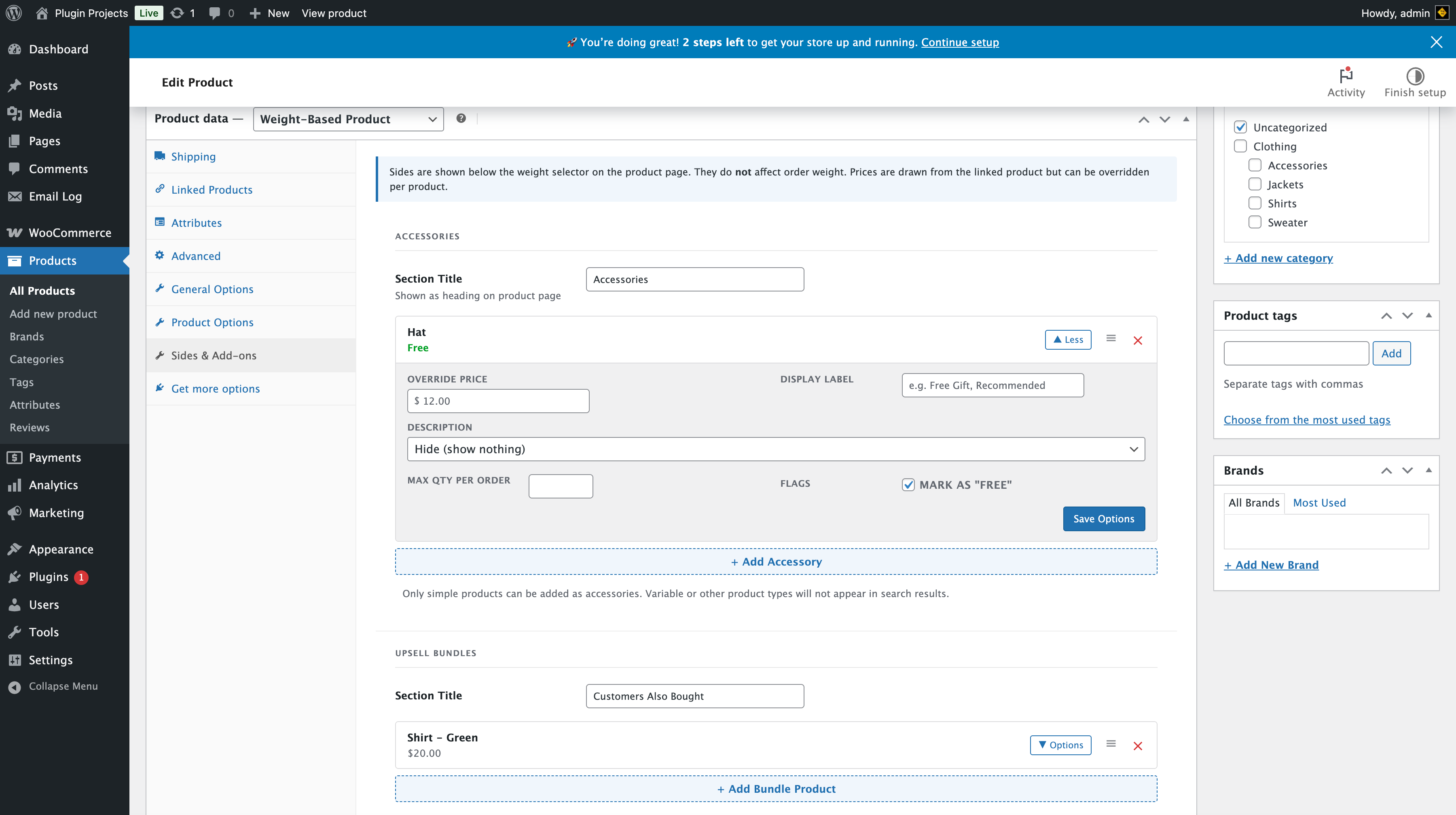
Sides are shown below the weight selector on the product page. They do not affect order weight. Prices are drawn from the linked product but can be overridden per product. If both Accessories and Upsell Bundles are disabled in WBP Settings → Sides & Add-ons, a notice explains to enable them there first.
Accessories
Section title — Shown as heading on the product page (e.g. “Accessories”). Then add accessories by searching for simple products. For each accessory you can set:
- Override price — Override the product price (e.g. $12.00 or Free).
- Display label — Optional (e.g. “Free Gift”, “Recommended”).
- Description — e.g. “Hide (show nothing)” or show product description.
- Max qty per order — Optional limit.
- Mark as “FREE” — Show as free; price override can still be set.
Only simple products can be added as accessories. Variable or other product types do not appear in search. Use the + Add Accessory button to search and add; use the X to remove, and the handle to reorder.
Upsell bundles
Section title — e.g. “Customers Also Bought”. Add bundle products via + Add Bundle Product. Each appears as a single-toggle add-on (customer can add one or more depending on configuration). You can reorder or remove items.