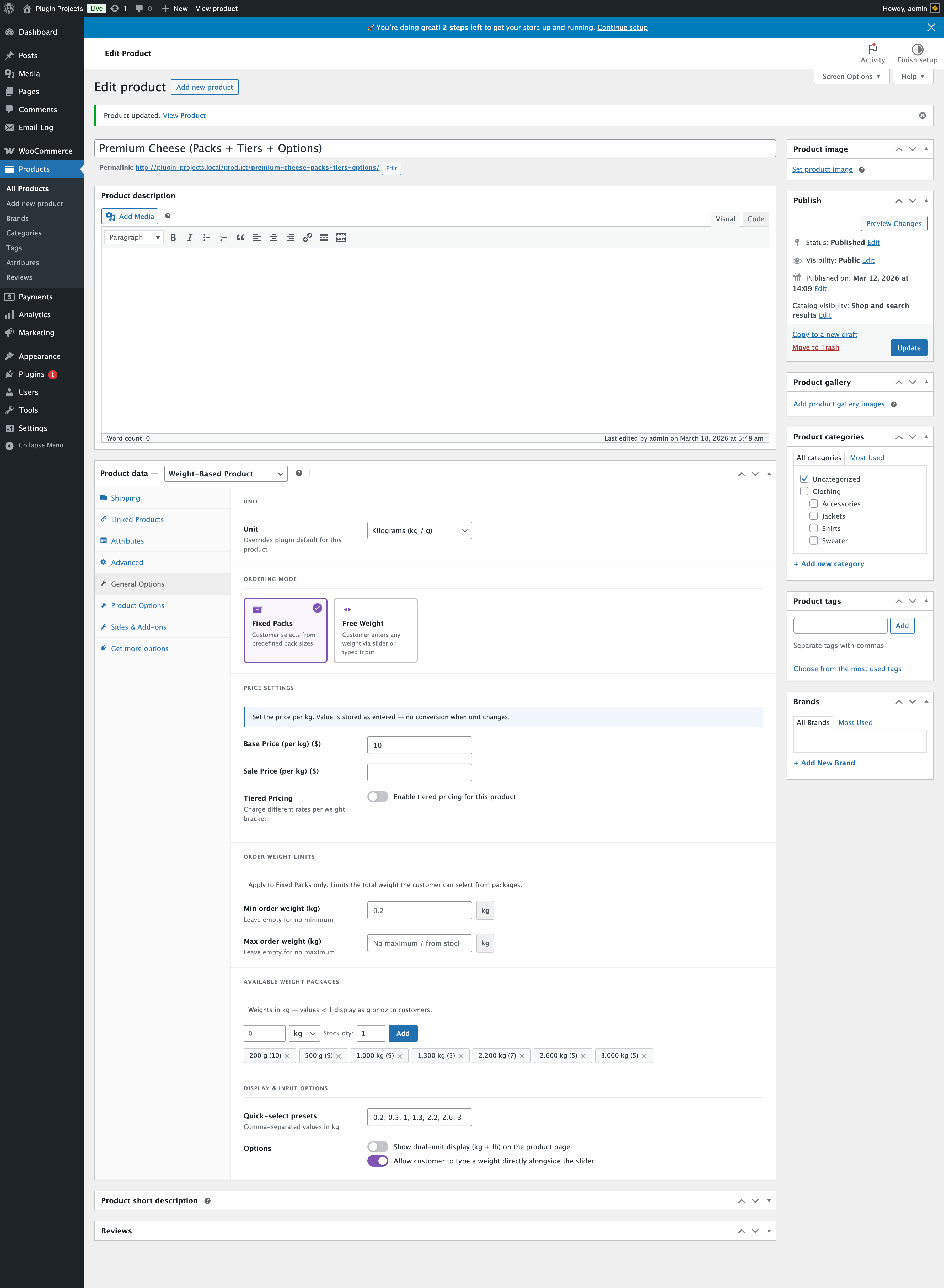
Unit
Store default, Kilograms (kg / g), or Pounds (lb / oz). Overrides the plugin default for this product only. Prices and weights are stored in the chosen unit; there is no automatic conversion if you change the unit later.
Ordering mode
Fixed Packs — Customer selects from predefined pack sizes. Free Weight — Customer enters any weight via slider or typed input. This page describes the settings visible when Fixed Packs is selected. Sections that only apply to Fixed Packs (including Available Weight Packages and Pack list display) are hidden if you switch the product to Free Weight.
Price settings
Set the price per unit (kg or lb). Value is stored as entered; no conversion when unit changes.
- Base Price (per kg/lb) — Regular price per weight unit.
- Sale Price (per kg/lb) — Optional sale price per unit.
Tiered pricing
Enable tiered pricing to charge different rates per weight bracket. Use Global — Use tiers from Settings → Pricing Rules (must be enabled there). Use Product Level — Define tiers only for this product (From / To / Price per unit table). Weights outside any tier use the base price.
Order weight limits
Apply to Fixed Packs only. Limit the total weight the customer can select from packages.
- Min order weight — Leave empty for no minimum.
- Max order weight — Leave empty for no maximum (or “No maximum / from stock”).
Available weight packages
Weights are entered in the product’s unit (kg or lb). Values < 1 are shown as g or oz to customers. For each package you set weight, unit (kg/g or lb/oz), and stock quantity, then click Add. Packages appear as draggable “pills”; use the grip icon to reorder. In the admin, pills may show stock-tier colours (green / amber / red) based on the global Low stock badge threshold — this helps staff at a glance; the storefront does not tint whole rows the same way.
Click a pill to open the Edit package dialog: adjust weight, stock qty (0 = out of stock), and an optional Marketing badge (e.g. Recommended, Best seller) shown next to the pack name on the product page. Remove a badge by choosing None.
Pack list display
This block appears after Available weight packages (and only for Fixed Packs).
- Sort packages by — Override the store default (WooCommerce → Weight Based Products → General → Pack list order): use store default, ascending, descending, or Catalog order to follow the pill order above.
- Package card style — Override global Appearance → Package card style for this product: use store default, list rows, or card grid.
Display & input options
- Quick-select presets — Comma-separated values in the product unit (e.g. 0.2, 0.5, 1, 1.3, 2.2, 2.5, 3). Shown as preset chips on the frontend.
- Show dual-unit display (kg + lb) — Show both units on the product page.
- Allow customer to type a weight — Allow typed input alongside the pack selector (e.g. “Choose desired weight” with recalc).