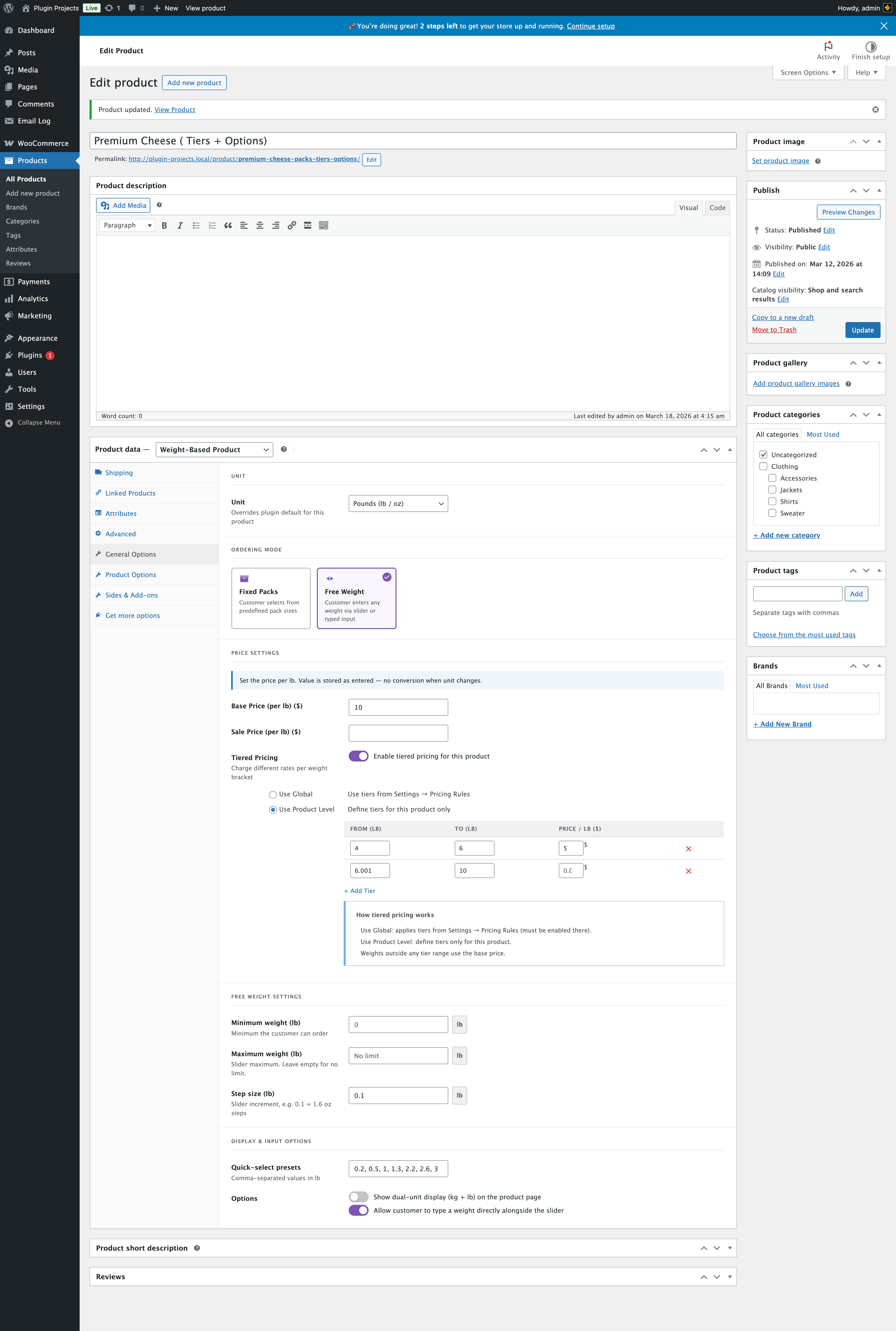
Unit and ordering mode
Same as Fixed Packs: choose Unit (store default, kg, or lb) and select Free Weight so the customer can enter any weight via slider or typed input.
Price settings and tiered pricing
Base price and optional sale price per unit; optional tiered pricing (Use Global or Use Product Level with From/To/Price table). Weights outside any tier use the base price.
Free weight settings
These fields appear only when Free Weight is selected.
- Minimum weight — Minimum the customer can order. Leave 0 or set a positive value in the product unit.
- Maximum weight — Slider maximum. Leave empty for no limit (placeholder may show “No limit”).
- Step size — Slider increment in the product unit. The hint is unit-aware: for kg it shows e.g. “0.1 = 100 g steps”; for lb it shows e.g. “0.1 = 1.6 oz steps”.
Display & input options
- Quick-select presets — Comma-separated values in the product unit (e.g. 0.7, 0.95, 1, 1.1, 2, 2.8, 3). Shown as preset buttons on the frontend.
- Show dual-unit display (kg + lb) — Show both units on the product page.
- Allow customer to type a weight — Allow a direct weight input alongside the slider.